What is SAML ?
SAML is the short form for Security Assertion Markup Language.
It is a xml based open standard that allows web domains to exchange user’s authentication and authorization data.
SAML involves 3 parties;
- Identity Provider (IdP)
- Service Provider (SP)
- Principal (usually an end-user)
A scenario based example,
Imagine a scenario where you(In SAML jargon, a principal) need to access your company’s email hosted in microsoft office 365 (In SAML jargon, a service provider). Your company maintains a directory of users and an authentication mechanism to authenticate using active directory (In SAML jargon, Identity Provider).
Let’s assume that company’s email is accessible at (mail.company.com)
When you want to read your emails from mail.company.com, depending on, where you are coming from it could automatically let you in, into hosted mail service with out asking for credentials. Being able to authenticate only once to your company network (or Identity Provider in SAML jargon) and subsequently login to many applications (or Service Providers) without having to type in a password again (Sounds like single sign-on right yeah, it is also known as Multi-Domain Single Sign-On – MDSSO).
In simple words,
YOU want to consume a service provided by a provider. Since the service does not know who you are it would redirect you to the configured identity provider to make sure you are an authenticated user. All of the above is facilitated via SAML protocol/assertions.
In this case,
- Identity Provider = Directory of users on AD.
- Service Provider = Office 365 service from microsoft.
- Principal = You or end user.
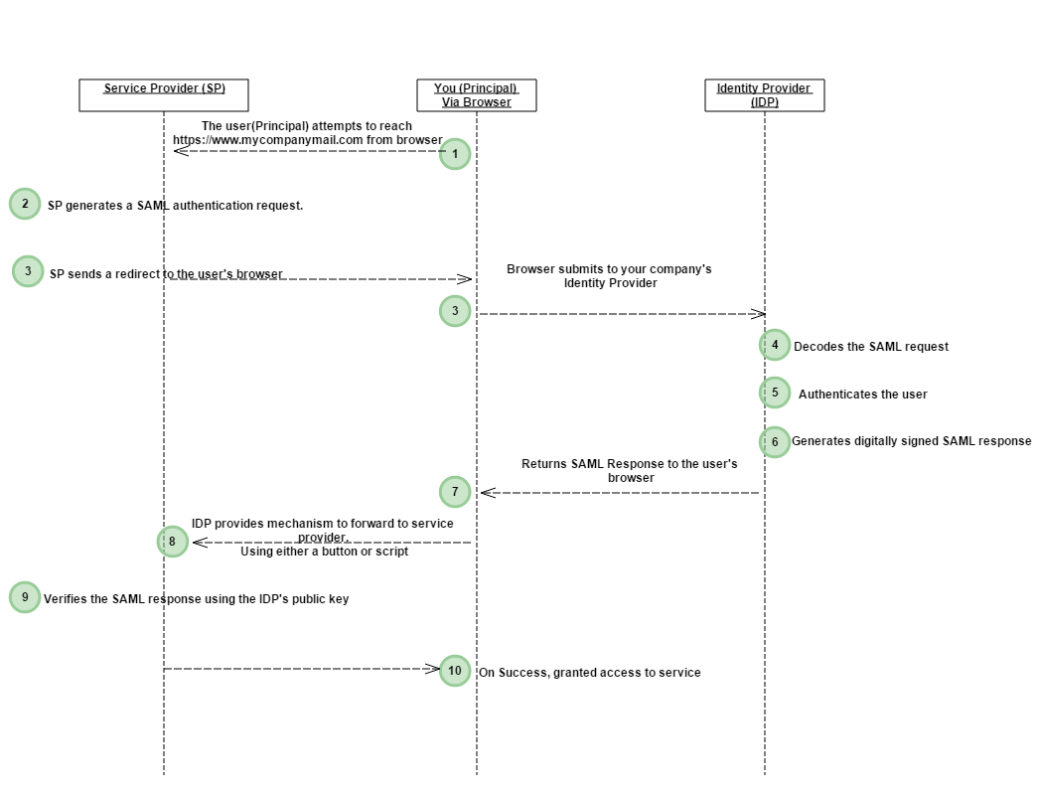
- The user(Principal) attempts to reach a hosted application(Service) at https://www.mycompanymail.com from a browser.
- Service Provider generates a SAML authentication request. The SAML request is encoded and embedded into the URL.
- Service Provider sends a redirect to the user’s browser. The redirect URL includes the encoded SAML authentication request that should be submitted to Identity Provider (IDP).
- The Identity Provider decodes the SAML request and extracts the necessary components of the request.
- The Identity Provider then authenticates the user. Identity Provider could authenticate users by either asking for valid login credentials or by checking for valid session cookies.
- The Identity Provider generates a SAML response that is digitally signed with the partner’s public and private keys.
- The Identity Provider encodes the SAML response and returns that information to the user’s browser.
- The Identity Provider provides a mechanism so that the browser can forward that information to service provider.
For example,
The Identity Provider could embed the SAML response and destination URL in a form and provide a button that the user can click to submit the form to Service Provider.
OR
The Identity Provider could also include JavaScript on the page that automatically submits the form to Service Provider. - Service Provider’s service verifies the SAML response using the Identity Provider’s public key.
- If the response is successfully verified, The user would be redirected to the destination URL and is logged in to office 365.
The above is an example of user’s authentication using SAML assertion.
A similar kind of example could be described for user’s authorization using SAML.
How does the SAML Request & Response looks like ?
SAML Request
This file contains hidden or bidirectional Unicode text that may be interpreted or compiled differently than what appears below. To review, open the file in an editor that reveals hidden Unicode characters.
Learn more about bidirectional Unicode characters
| <samlp:AuthnRequest xmlns:samlp="urn:oasis:names:tc:SAML:2.0:protocol" xmlns:saml="urn:oasis:names:tc:SAML:2.0:assertion" ID="_7171b0b2-19f2-4ba2-8f94-24b5e56b7f1e" IssueInstant="2014-01-30T16:18:35Z" Version="2.0" AssertionConsumerServiceIndex="0" > | |
| <saml:Issuer>urn:federation:MicrosoftOnline</saml:Issuer> | |
| <samlp:NameIDPolicy Format="urn:oasis:names:tc:SAML:2.0:nameid-format:persistent"/> | |
| </samlp:AuthnRequest> |
SAML Response
This file contains hidden or bidirectional Unicode text that may be interpreted or compiled differently than what appears below. To review, open the file in an editor that reveals hidden Unicode characters.
Learn more about bidirectional Unicode characters
| <samlp:Response ID="_592c022f-e85e-4d23-b55b-9141c95cd2a5" Version="2.0" IssueInstant="2014-01-31T15:36:31.357Z" Destination="https://login.microsoftonline.com/login.srf" Consent="urn:oasis:names:tc:SAML:2.0:consent:unspecified" InResponseTo="_049917a6-1183-42fd-a190-1d2cbaf9b144" xmlns:samlp="urn:oasis:names:tc:SAML:2.0:protocol"> | |
| <Issuer xmlns="urn:oasis:names:tc:SAML:2.0:assertion">http://WS2012R2-0.contoso.com/adfs/services/trust</Issuer> | |
| <samlp:Status> | |
| <samlp:StatusCode Value="urn:oasis:names:tc:SAML:2.0:status:Success" /> | |
| </samlp:Status> | |
| <Assertion ID="_7e3c1bcd-f180-4f78-83e1-7680920793aa" IssueInstant="2014-01-31T15:36:31.279Z" Version="2.0" xmlns="urn:oasis:names:tc:SAML:2.0:assertion"> | |
| <Issuer>http://WS2012R2-0.contoso.com/adfs/services/trust</Issuer> | |
| <ds:Signature xmlns:ds="http://www.w3.org/2000/09/xmldsig#"> | |
| <ds:SignedInfo> | |
| <ds:CanonicalizationMethod Algorithm="http://www.w3.org/2001/10/xml-exc-c14n#" /> | |
| <ds:SignatureMethod Algorithm="http://www.w3.org/2000/09/xmldsig#rsa-sha1" /> | |
| <ds:Reference URI="#_7e3c1bcd-f180-4f78-83e1-7680920793aa"> | |
| <ds:Transforms> | |
| <ds:Transform Algorithm="http://www.w3.org/2000/09/xmldsig#enveloped-signature" /> | |
| <ds:Transform Algorithm="http://www.w3.org/2001/10/xml-exc-c14n#" /> | |
| </ds:Transforms> | |
| <ds:DigestMethod Algorithm="http://www.w3.org/2000/09/xmldsig#sha1" /> | |
| <ds:DigestValue>CBn/5YqbheaJP425c0pHva9PhNY=</ds:DigestValue> | |
| </ds:Reference> | |
| </ds:SignedInfo> | |
| <ds:SignatureValue>TciWMyHW2ZODrh/2xrvp5ggmcHBFEd9vrp6DYXp+hZWJzmXMmzwmwS8KNRJKy8H7XqBsdELA1Msqi8I3TmWdnoIRfM/ZAyUppo8suMu6Zw+boE32hoQRnX9EWN/f0vH6zA/YKTzrjca6JQ8gAV1ErwvRWDpyMcwdYCiWALv9ScbkAcebOE1s1JctZ5RBXggdZWrYi72X+I4i6WgyZcIGai/rZ4v2otoWAEHS0y1yh1qT7NDPpl/McDaTGkNU6C+8VfjD78DrUXEcAfKvPgKlKrOMZnD1lCGsViimGY+LSuIdY45MLmyaa5UT4KWph6dA==</ds:SignatureValue> | |
| <KeyInfo xmlns="http://www.w3.org/2000/09/xmldsig#"> | |
| <ds:X509Data> | |
| <ds:X509Certificate>MIIC7jCCAdagAwIBAgIQRrjsbFPaXIlOG3GTv50fkjANBgkqhkiG9w0BAQsFADAzMTEwLwYDVQQDEyhBREZTIFNpZ25pbmcgLSBXUzIwMTJSMi0wLnN3aW5mb3JtZXIuY29tMB4XDTE0MDEyMDE1MTY0MFoXDTE1MDEyMDE1MTY0MFowMzExMC8GA1UEAxMoQURGUyBTaWduaW5nIC0gV1MyMDEyUjItMC5zd2luZm9ybWVyLmNvbTCCASIwDQYJKoZIhvcNAQEBBQADggEPADCCAQoCggEBAKe+rLVmXy1QwCwZwqgbbp1/+3ZWxd9T/jV0hpLIIWr+LCOHqq8n8beJvlivgLmDJo8f+EITnAxWcsJUvVai/35AhHCUq9tc9sqMp5PWtabAEMb2AU72/QlX/72D2/NbGQq1BWYbqUpgpCZ2nSgvlWDHlCiUo//UGsvfox01kjTFlmqQInsJVfRxF5AcCAwEAATANBgkqhkiG9w0BAQsFAAOCAQEAi8c6C4zaTEc7aQiUgvnGQgCbMZbhUXXLGRpjvFLKaQzkwa9eq7WLJibcSNyGXBa/SfT5wJgsm3TPKgSehGAOTirhcqHheZyvBObAScY7GOT+u9pVYp6raFrc7ez3c+CGHeV/tNvy1hJNs12FYH4X+ZCNFIT9tprieR25NCdi5SWUbPZL0tVzJsHc1y92b2M2FxqRDohxQgJvyJOpcg2mSBzZZIkvDg7gfPSUXHVS1MQs0RHSbwq/XdQocUUhl9/e/YWCbNNxlM84BxFsBUok1dH/gzBySx+Fc8zYi7cOq9yaBT3RLT6cGmFGVYZJW4FyhPZOCLVNsLlnPQcX3dDg9A==</ds:X509Certificate> | |
| </ds:X509Data> | |
| </KeyInfo> | |
| </ds:Signature> | |
| <Subject> | |
| <NameID Format="urn:oasis:names:tc:SAML:2.0:nameid-format:persistent">ABCDEG1234567890</NameID> | |
| <SubjectConfirmation Method="urn:oasis:names:tc:SAML:2.0:cm:bearer"> | |
| <SubjectConfirmationData InResponseTo="_049917a6-1183-42fd-a190-1d2cbaf9b144" NotOnOrAfter="2014-01-31T15:41:31.357Z" Recipient="https://login.microsoftonline.com/login.srf" /> | |
| </SubjectConfirmation> | |
| </Subject> | |
| <Conditions NotBefore="2014-01-31T15:36:31.263Z" NotOnOrAfter="2014-01-31T16:36:31.263Z"> | |
| <AudienceRestriction> | |
| <Audience>urn:federation:MicrosoftOnline</Audience> | |
| </AudienceRestriction> | |
| </Conditions> | |
| <AttributeStatement> | |
| <Attribute Name="IDPEmail"> | |
| <AttributeValue>administrator@contoso.com</AttributeValue> | |
| </Attribute> | |
| </AttributeStatement> | |
| <AuthnStatement AuthnInstant="2014-01-31T15:36:30.200Z" SessionIndex="_7e3c1bcd-f180-4f78-83e1-7680920793aa"> | |
| <AuthnContext> | |
| <AuthnContextClassRef>urn:oasis:names:tc:SAML:2.0:ac:classes:PasswordProtectedTransport</AuthnContextClassRef> | |
| </AuthnContext> | |
| </AuthnStatement> | |
| </Assertion> | |
| </samlp:Response> |
What are the scenarios in which SAML is useful ?
SAML addresses the import requirements that is single sign-on for web browser based sign-in.
For a details information, please refer to the SAML technical overview
http://docs.oasis-open.org/security/saml/Post2.0/sstc-saml-tech-overview-2.0.html
 Devakumar Sai Chinthala