Introduction:
This article describes how to design & invoke the page methods using asp.net ajax and jquery. The topics that are covered in this are
- What are page methods
- How to enable page methods in a web page.
- Can we implement page methods in a web page?
- Can we implement page methods in a user control?
- Can we implement page methods in a master page?
- How to use jquery to call the methods on the server side.
- Comparison of page method calls using asp.net ajax and jquery.
Tools used:
The tools used for creating this walkthrough are,
- Visual studio 2010.
- .Net framework 3.5
- Jquery 1.4.1
What are page methods in asp.net?
Page methods are static methods which are defined in the page and can be invoked from the client script with out post backing the whole web page. Page methods are web methods which are defined in the asp.net web page. Page methods are decorated with attributes “WebMethod” & “ScriptMethod” in order to be callable from a client side script.
Web methods are also defined in the web service to expose the web service operations. In short, using the page methods one can invoke a server side function from client side script.
How to enable page methods and what are the steps involved.
Defining page methods is a very simple and straight forward approach.
Here are the steps.
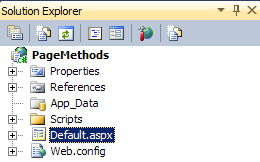
- Create an asp.net web application project. Call it “PageMethods”.

- Once the project is created, open the “Default.aspx” in the source mode and add the ScriptManager to the body of the webpage.
<asp:ScriptManager ID="ScriptManager1" runat="server"></asp:ScriptManager>
- In order to enable the page methods, add the EnablePageMethods=”true” attribute to the “ScriptManager”. By adding the “EnablePageMethods”, asp.net generates the necessary proxy code at the client side to invoke the methods that are marked as “WebMethod”. In order to view the proxy code generated by asp.net open the web page in a browser -> view source.
<asp:ScriptManager ID=”ScriptManager1″ EnablePageMethods=”true” runat=”server”/>

- Once the necessary attributes are added to the page, add the server side methods. To add the methods open the web page’s code-behind/ code-beside in visual studio. Add the following methods.
[System.Web.Services.WebMethod][System.Web.Script.Services.ScriptMethod]
public static string CallHelloWorld()
{return “Hello World”;}[System.Web.Services.WebMethod][System.Web.Script.Services.ScriptMethod]
public static int Add(int val1, int val2)
{ return val1 + val2; }The “CallHelloworld” method returns a string value.
The “Add” method accepts 2 integer values and returns a sum of them. - In order to invoke the page methods from the client side script, add 2 buttons to the web page. One for each type of call. The onclick events of the buttons are tied to the client side event handlers.
<input type=”button” onclick=”onCallHelloWorld();” value=”Call HelloWorld” />
<input type=”button” onclick=”onCallAdd();” value=”Call Add” />
- When a button is clicked, it calls its client side handler which will invoke the server side page methods. The follow is the series of event Client side click event -> Client side event handler call -> Server side page method.The implementation of the client event handler to invoke the page methods is as below
function onCallHelloWorld() {
PageMethods.HelloWorld(OnSucceeded, OnFailed);
}function onCallAdd() {
PageMethods.Add(6,5,OnSucceeded, OnFailed);
}// set the destination textbox value with the ContactName
function OnSucceeded(res, destCtrl) {
alert(res);
}// alert message on some failure
function OnFailed(error, destCtrl) {
alert(“Stack Trace: ” + error.get_stackTrace() + “/r/n” +
“Error: ” + error.get_message() + “/r/n” +
“Status Code: ” + error.get_statusCode() + “/r/n” +
“Exception Type: ” + error.get_exceptionType() + “/r/n” +
“Timed Out: ” + error.get_timedOut());
}That’s it you are ready to make use of page methods from the client side script. While calling the page methods
- The values needed for server side method should be passed in first.
- After the parameters it has async method names as parameters, which are invoked upon a successful/failure operation, in this case “OnSucceeded” & “OnFailed”.
- There is an optional parameter called datacontext is allowed, while calling the PageMethods. The datacontext is used to pass any information to the “OnSucceeded” & “OnFailed” methods.
The above is the simplest form of implementation to demonstrate the pagemethods. The server side method can be extended to involve a database or a web service call for returning the data.
Calling or invoking PageMethods in user control
Invoking page methods defined in a user control is not possible by design. Asp.net does not generate the necessary client side proxy when page methods are declared in a user control.
A work around would be to create the pagemethods in the web page, which in turn invokes the methods in the user control from the web page. This approach has it’s own challenges while scaling for large implementations.
Calling or invoking PageMethods using Master Page
Invoking page methods in a master page is not possible by design. Asp.net does not generate the necessary client side proxy when page methods are declared in master page.
Calling or invoking PageMethods using Jquery
Calling the page methods using jquery is as easy as calling the page methods using the asp.net scriptmanager. The server side implementation is same for both, but the client side implementation is different. While using jquery there is no dependency on the ScriptManager. It is not necessary to have the ScriptManger to invoke the Pagemethods.
Here are the steps for client side implementation using jquery.
- Create an asp.net web page and call it “PageMethodJQuery.aspx”, we are going to use the name of the web page to make a call to the page method from client script.
- Add the following server side methods. To add the methods open the web page’s code-behind/ code-beside in visual studio. Add the following methods.
[System.Web.Services.WebMethod][System.Web.Script.Services.ScriptMethod]
public static string CallHelloWorld()
{ return “Hello World”; }[System.Web.Services.WebMethod][System.Web.Script.Services.ScriptMethod]
public static int Add(int val1, int val2)
{ return val1 + val2; }
- Include the jquery script file in the head section of the web page.
- Add the following button controls to the web page.
<input type=”button” onclick=”onCallHelloWorld();” value=”Call HelloWorld” />
<input type=”button” onclick=”onCallAdd();” value=”Call Add” />
The button controls acts as the trigger points for invoking the pagemethods.
- Add the following client side script to the web page.
function onCallHelloWorld() {
$.ajax({
type: “POST”,
url: “PageMethodJQuery.aspx/HelloWorld”,
data: “”,
contentType: “application/json; charset=utf-8”,
dataType: “json”,
success: function (msg) {
alert(msg.d);
},
error: function (objRequest) { alert(objRequest); }
});
}function onCallAdd() {
$.ajax({
type: “POST”,
url: “PageMethodJQuery.aspx/Add”,
data: “{val1:’2′,val2:’3′}”,
contentType: “application/json; charset=utf-8”,
dataType: “json”,
success: function (msg) {
alert(msg.d);
},error: function (objRequest) { alert(objRequest); }
});}
That’s it you are done with the implementation.
When a button is clicked, it calls its client side event handler which will invoke the server side methods.
PageMethods using ToolkitScriptManager (‘AjaxControlToolkit’ is undefined)
PageMethods can also be implemented using the ajax control toolkit’s script manager.
While using ajax control toolkit’s script manager, I got this annoying error ‘AjaxControlToolkit’ is undefined.
While trouble shooting an issue with a business user. It worked perfectly fine locally and on the web server. For one of the business user none of the asp.net ajax control toolkit controls were working.
Fortunately, the solution turned out to be pretty easy:
Set the “CombineScripts” property of the ToolkitScriptManager to false. CombineScripts=”false”
CombineScript attribute is available with ajax control toolkit’s scriptmanager only, it is not available with asp.net ajax scriptmanager.
<ajax:ToolkitScriptManager ID=”ToolkitScriptManager1″ EnablePageMethods=”true” CombineScripts=”false” runat=”server” ></ajax:ToolkitScriptManager>
Advantage of using page methods
There are many advantages of using the page methods
- It improves the responsiveness of a web page with out posting the whole page back.
- Calling the server side methods is as easy as calling any other method from client side script.
- The size of the request and response (for a normal exchange of data) is reasonable.
- It reduces the bandwidth of the transfer.
Here is a comparison of page methods calls using asp.net ajax client side script and jquery.
Both of them seem to respond quickly.
I have used pagemethods to optimize the performance of a web page whose size is nearly 300,000 bytes

No of bytes sent and received using the asp.net Ajax script manager

No of bytes sent and received using jquery
Conclusion
According to my experience/impression, pagemethods are low in popularity, but high in reliability. I have used pagemethods to optimize the performance of a web page whose size is nearly 300,000 bytes. The approach works very well irrespective of its size. One might want to consider using the pagemethods where you need to call a method on server side from client side script
 Devakumar Sai Chinthala
I really appreciate this post. I¡¦ve been looking all over for this! Thank goodness I found it on Bing. You have made my day! Thank you again
LikeLike